If you play Destiny 2 regularly, you know that creating the perfect armor build can take a lot of time. Every armor piece has different stats, and finding the right combination is not easy. This is where D2ArmorPicker becomes useful. It helps players build powerful armor sets without spending hours checking every item manually. Many new players search for How to use d2armorpicker because the tool looks advanced at first.
The good news is that anyone can learn it within a few minutes. Once you understand the basics, you can create builds for PvE, PvP, raids, Nightfalls, and seasonal activities much faster. This guide explains every important feature in simple English. By the end, you will know how to connect your account, choose the right stats, and create optimized builds with confidence.
ALSO READ Is d2armorpicker safe
What Is D2ArmorPicker?
D2ArmorPicker is a free online tool designed for Destiny 2 players. It scans the armor stored on your character and in your vault. Then it finds the best armor combinations based on the stats you want. Instead of checking hundreds of armor pieces yourself, the website performs the calculations automatically.
This saves time and helps you reach higher stat tiers. The tool does not change your game files or modify Destiny 2. It only reads your inventory after you give permission through Bungie’s secure login.
Why Players Use D2ArmorPicker
Destiny 2 includes six main armor stats. Every build depends on balancing these values.
| Armor Stat | What It Does |
| Mobility | Improves movement speed and jump effectiveness for some classes. |
| Resilience | Increases damage resistance and survivability. |
| Recovery | Speeds up health regeneration. |
| Discipline | Reduces grenade cooldown. |
| Intellect | Lowers Super ability cooldown. |
| Strength | Reduces melee ability cooldown. |
Finding armor that reaches multiple high stat tiers is difficult. D2ArmorPicker solves this problem by testing thousands of armor combinations in seconds.
Benefits of Using D2ArmorPicker
The tool offers many advantages for casual and experienced players.
1. It saves time. Instead of checking every armor piece, the website calculates everything automatically.
2. It improves your builds. You can reach better stat combinations than manual selection.
3. It supports every class. Hunters, Titans, and Warlocks can all use the platform.
4. It works with exotic armor. You can include your favorite exotic while still optimizing other stats.
5. It is free to use. No paid subscription is required.
How Destiny 2 Armor Stats Work
Before learning How to use d2armorpicker, you should understand stat tiers. Every armor stat increases in steps of ten.
For example:
| Stat Value | Tier |
| 10 | Tier 1 |
| 20 | Tier 2 |
| 50 | Tier 5 |
| 80 | Tier 8 |
| 100 | Tier 10 |
Only full tiers matter. A value of 89 performs the same as 80 because it has not reached the next tier. That is why armor optimization is important.
How to Use D2ArmorPicker Step by Step
Now let’s look at How to use d2armorpicker from start to finish.
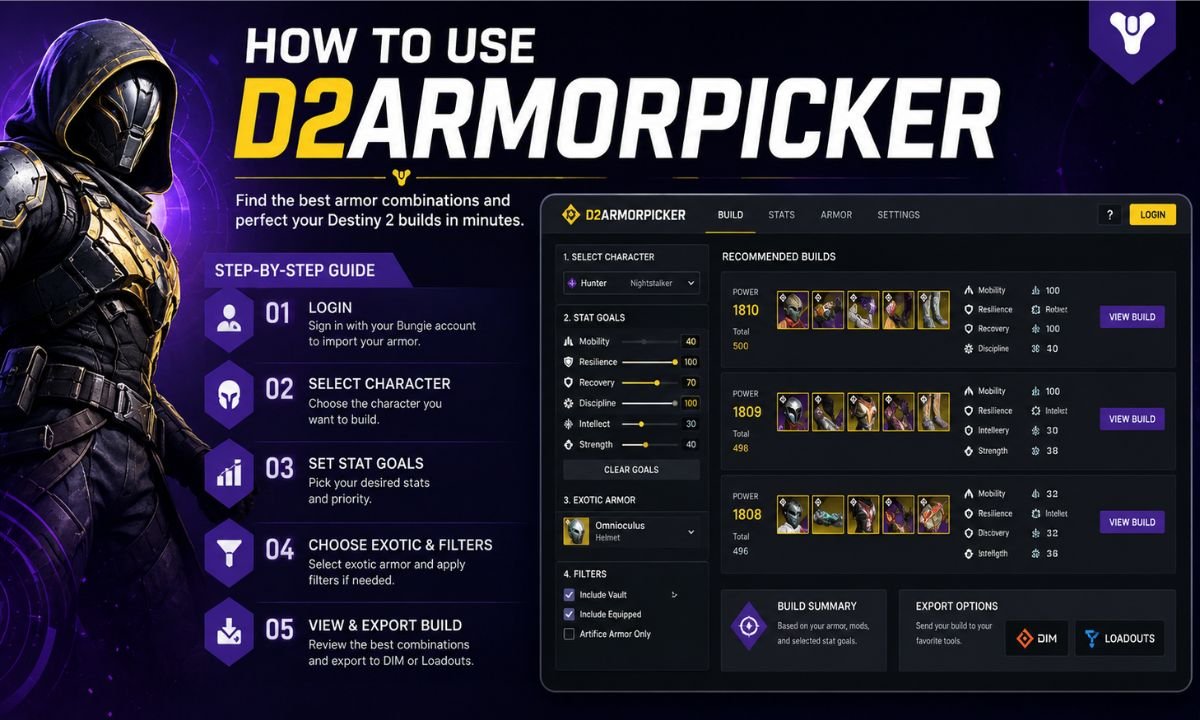
Step 1: Visit the Website
Open the D2ArmorPicker website in your browser. The homepage contains the main build planner.
Step 2: Sign In with Bungie
Click the login button. Use your Bungie account to authorize access.
Step 3: Select Your Character
Choose the character you want to optimize.
You can select:
- Hunter
- Titan
- Warlock
Each character has its own armor inventory.
Step 4: Choose Your Desired Stats
Select the stats you want to maximize.
For example:
- 100 Resilience
- 100 Discipline
- High Recovery
The tool immediately starts calculating possible armor combinations.
Step 5: Select an Exotic Armor Piece
If your build requires an exotic helmet, chest piece, gloves, boots, or class item, lock it into the build. The optimizer will only use combinations that include your chosen exotic.
Step 6: Apply Additional Filters
You can filter results based on:
- Armor energy
- Masterworked gear
- Artifice armor
- Available mods
- Fragments
- Seasonal artifact bonuses
These filters make the results even more accurate.
Step 7: Review the Results
The website displays several optimized armor combinations.
Each result shows:
- Final stat tiers
- Required mods
- Total energy cost
- Armor pieces to equip
Choose the build that matches your playstyle.
Understanding Armor Optimization
The website performs millions of calculations behind the scenes. Instead of maximizing one stat, it balances multiple stats together.
For example:
| Build Type | Recommended Focus |
| PvE | Resilience, Discipline, Recovery |
| PvP | Recovery, Mobility, Resilience |
| Raid | Resilience and Discipline |
| Solo Activities | Recovery and Resilience |
This helps players create builds that match specific activities.
Using Fragments and Mods
Fragments can increase or decrease armor stats.
For example:
- One fragment may add +10 Recovery.
- Another may reduce Discipline.
D2ArmorPicker includes these adjustments while calculating your build. Armor mods also affect your final stats. Always enable the mods you plan to use before choosing your final build.
Artifice Armor Support
Artifice armor provides extra stat flexibility. The website automatically considers these bonus points during optimization. Players who complete Master dungeons often receive Artifice armor, making it easier to achieve triple 100 stat builds.
Common Build Goals
Many Destiny 2 players focus on these stat combinations.
| Build Goal | Primary Stats |
| Grenade Build | Discipline + Resilience |
| Melee Build | Strength + Resilience |
| Fast Healing | Recovery + Resilience |
| PvP Hunter | Mobility + Recovery |
| Endgame PvE | Resilience + Discipline + Recovery |
These combinations provide a strong starting point.
Tips for Better Results
After learning How to use d2armorpicker, you can improve your builds with a few simple habits.
1. Keep your vault organized so every armor piece is available during optimization.
2. Masterwork high-quality armor because extra stat points increase optimization options.
3. Avoid deleting armor with unusual stat distributions.
4. Save multiple builds for different activities.
5. Update your builds whenever you obtain new armor.
Common Mistakes to Avoid
1. Many beginners make small mistakes while optimizing armor.
2. Ignoring fragments often leads to incorrect stat calculations.
3. Some players forget to include their exotic armor before generating results.
4. Others optimize only one stat instead of balancing multiple important stats.
5. Finally, always double-check that the required armor mods fit within your available energy.
Is D2ArmorPicker Safe?
Yes. D2ArmorPicker uses Bungie’s official API to access your inventory. It cannot steal your items or change your game progress. Thousands of Destiny 2 players use the tool daily. Always log in through Bungie’s official authentication system to keep your account secure.
Who Should Use D2ArmorPicker?
The tool benefits nearly every Destiny 2 player.
1. Beginners can quickly understand which armor pieces are worth keeping.
2. Experienced players can chase triple 100 stat builds with much less effort.
3. Raid teams often use it before challenging endgame content.
4. PvP players rely on it to maximize competitive performance.
5. Even casual players can save valuable time while organizing their inventory.
Readers interested in digital creativity and multimedia tools can also explore Adobe to learn about industry-leading software for design, photography, video editing, and creative projects.
Final Thoughts
Learning How to use d2armorpicker makes Destiny 2 armor management much easier. Instead of sorting through hundreds of armor pieces manually, the tool performs complex calculations in seconds. It helps you reach better stat tiers, supports exotic armor, and works with mods, fragments, and Artifice gear.
Whether you enjoy raids, Nightfalls, Trials, or casual activities, D2ArmorPicker helps you create stronger builds with less effort. Spend a few minutes learning the tool, and you will save countless hours while improving your Guardian’s performance throughout every season.
Frequently Asked Questions
Q. Is D2ArmorPicker free to use?
Yes. D2ArmorPicker is completely free and available to every Destiny 2 player.
Q. Does D2ArmorPicker work for all Destiny 2 classes?
Yes. It supports Hunters, Titans, and Warlocks.
Q. Can I use exotic armor with D2ArmorPicker?
Yes. You can lock your favorite exotic into the build before generating results.
Q. Is D2ArmorPicker safe for my Bungie account?
Yes. It uses Bungie’s official API and only reads your inventory after authorization.
Q. Can D2ArmorPicker help me get triple 100 stats?
Yes. If your armor collection allows it, the tool can identify combinations that reach triple 100 stat builds.
Q. Do I need masterworked armor to use D2ArmorPicker?
No. However, masterworked armor provides extra stat points, making it easier to achieve higher stat tiers.