How to Use the D2ArmorPicker App to Maximize Your Destiny 2 Build
Destiny 2 is a game where power isn’t only about weapons or skills—your armor stats play a huge role in how strong, fast, and efficient your Guardian becomes. Whether you are a new player trying to understand what “Resilience” does or an experienced Guardian wanting the perfect triple-100 stats, tools like D2ArmorPicker make your job a lot easier.
The D2ArmorPicker app has become one of the most trusted tools for Destiny 2 players who want to build their loadouts professionally. It analyzes your armor, mods, and stat combinations to give you the most optimized build possible. In this article, you will learn what D2ArmorPicker is, how it works, how to use it step-by-step, and how it helps you maximize your Destiny 2 build.
What Is the D2ArmorPicker App?
D2ArmorPicker is a third-party web tool designed specifically for Destiny 2 players who want the best possible armor stat combinations. It scans your characters, vault, armor rolls, mods, and preferences to create perfect builds for:
PvE (Strikes, Raids, Nightfalls)
PvP (Crucible, Trials of Osiris)
Gambit
Endgame activities
It is built to save time for players. Instead of manually checking hundreds of pieces of armor and mods, the app calculates the best setup in seconds.
Is D2ArmorPicker Safe?
Yes, D2ArmorPicker is safe to use because:
You sign in using Bungie’s official OAuth login.
The website does not store your password.
It only reads your armor information.
Many Destiny 2 content creators, streamers, and build crafters trust this app.
Why You Should Use the D2ArmorPicker App
Building an optimized set of armor in Destiny 2 can be challenging because each armor piece has:
6 stats
Different energy types
Random rolls
Seasonal mods
Exotic slot limitations
You can easily get confused choosing the right combination. D2ArmorPicker solves this by:
1. Saving Time
Manually checking hundreds of armor pieces can take hours. This tool suggests the best options instantly.
2. Giving Stat-Optimal Builds
Whether you want 100 Resilience or a balanced build, the app targets it accurately.
3. Helping Choose the Best Exotic
If multiple Exotics can fit your build, it shows which one gives better stats.
4. Avoiding Resource Waste
It helps you avoid upgrading armor unnecessarily, saving:
Prisms
Shards
Glimmer
Enhancement Cores
5. Perfect for Endgame Players
If you play Grandmaster Nightfalls, Raids, or Trials, a good build is crucial.
Understanding Destiny 2 Armor Stats (Before Using the App)
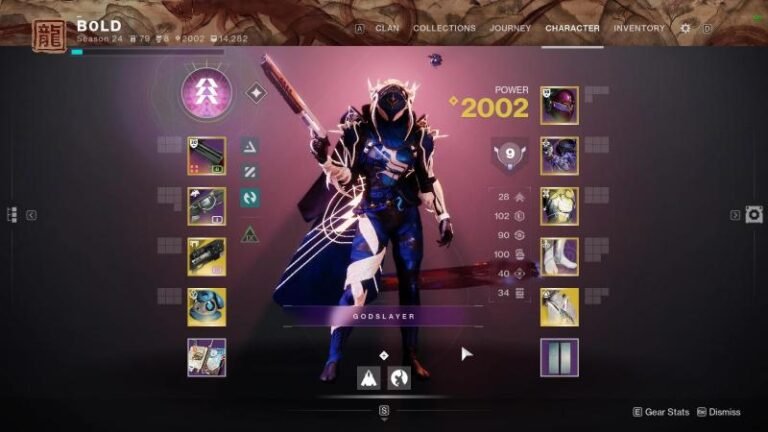
To fully understand the tool’s recommendations, you should know what each stat does:
Resilience
Reduces incoming damage
Essential for endgame PvE
Most players aim for 100
Recovery
Faster health regeneration
Important in both PvE & PvP
Mobility
Sprint speed & jump height
Crucial for Hunters
Discipline
Reduces grenade cooldown
Great for ability-based builds
Intellect
Improves Super regeneration
Less important after recent changes
Strength
Reduces melee cooldown
Good for melee-focused builds
D2ArmorPicker helps you reach your ideal stat combination without guessing.
How to Use the D2ArmorPicker App (Step-by-Step Guide)
Here is the complete, simple process.
Step 1: Open the D2ArmorPicker Website
Go to the official website.
You don’t need to download anything—it’s a browser-based tool.
Step 2: Log In with Your Bungie Account
Click “Login with Bungie”.
You can log in using:
PlayStation
Steam
Xbox
Epic Games
This login process is completely secure since it’s handled by Bungie.
Step 3: Sync Your Armor Data
Once logged in, the tool will read:
Your vault
Characters
Armor stats
Equipped gear
This takes only a few seconds.
Step 4: Choose Your Build Focus
This is where the real build crafting begins.
You can select:
Stat Priorities (e.g., 100 Resilience / 100 Recovery / 60 Discipline)
Exotic armor preferences
Mod energy limitations
Artifice armor inclusion
Armor you don’t want to use
Your class (Hunter, Titan, Warlock)
This gives the tool clear instructions.
Step 5: Set Your Desired Stats
You can choose combinations like:
100 / 100 / 100
100 / 70 / 50
70 / 70 / 70
Or any mix you prefer
The more realistic your target is, the better the results.
Step 6: Click “Find Build”
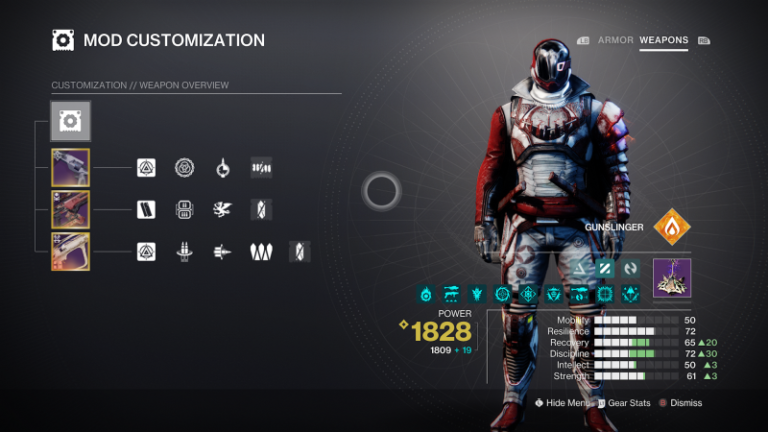
The tool will calculate the best armor combination from your inventory. Within a few seconds, it shows:
Suggested armor pieces
Exotic choice
Stat totals
Mod placement
Additional changes needed (if any)
This is your optimized build.
Step 7: Send the Build to the Destiny Item Manager (DIM)
D2ArmorPicker integrates with DIM, allowing you to push the build directly.
This lets you equip everything in one click.
It’s extremely convenient for players who don’t want to manually search their vault.
Advanced Features of D2ArmorPicker
The app also offers some advanced options many players don’t know about:
1. Artifice Armor Support
If you have Dungeon or Master Raid armor, D2ArmorPicker adds Artifice mods to help reach perfect stats.
2. Exotic Filtering
Choose the exact Exotic you want to build around, such as:
Wormhusk Crown
Synthoceps
Phoenix Protocol
Or leave it open to get the best stat roll suggestions.
3. Mod Optimizer
The app checks:
Energy cost
Element (Arc / Solar / Void / Stasis / Strand)
Seasonal slots
It makes sure the build is realistic and easy to equip.
4. Filtering Out Low Rolls
You can exclude bad armor such as:
50 stat rolls
Unfavorable stat distribution
Wrong energy type
This ensures only high-value armor is used.
5. Multi-Character Analysis
The tool doesn’t just look at your current character. It includes:
Hunters
Titans
Warlocks
Vault armor
This gives you more combinations and stronger builds.
Tips to Maximize Your Builds with D2ArmorPicker
Here are some pro tips to get the most out of the tool:
1. Always Lock Your Best Armor in DIM
So you don’t accidentally delete or infuse it.
2. Try Different Stat Combinations
Sometimes you may get better results with slightly adjusted priorities like:
100 / 90 / 80
100 / 60 / 60
3. Keep Artifice Armor—Don’t Shard It
Even low base stat artifice armor can help you reach perfect tier stats.
4. Don’t Ignore Mods
Mods can drastically change your build performance, especially in PvP and endgame PvE.
5. Re-check Builds After New Seasons
When Bungie releases new armor or mods, your old build may not be optimal anymore.
Why D2ArmorPicker Is a Must-Have Tool for Destiny 2 Players
If you want to take Destiny 2 seriously—whether you are a solo player, PvP lover, or raid expert—D2ArmorPicker is one of the best tools you can use.
It helps you:
Save time
Avoid mistakes
Use the best armor
Improve your combat performance
Build better Guardian loadouts
Players who use this app consistently perform better in:
Raids
Grandmasters
Trials of Osiris
Crucible matches
Solo flawless dungeons
Conclusion
D2ArmorPicker is more than just an armor calculator—it is a powerful, smart tool that helps you create the most optimized build possible in Destiny 2. Instead of wasting hours checking armor pieces and mods manually, you can get perfect stat combinations within minutes.
By following the steps in this guide, you can fully understand how the app works and use it to upgrade your gameplay. Whether you want a tanky 100 Resilience build, a fast Mobility setup, or an ability-focused kit, this tool helps you achieve it effortlessly.